Free Conduit Fill Calculator Spreadsheet for Excel (Download + How to Use It)
Download our free Excel conduit fill calculator spreadsheet. Perfect for electricians and contractors to calculate mixed wire fill and NEC compliance offline.

Mar Küs T. Webb
Lisanslı Elektrikçi & Teknik Yazıcı
İçindekiler
- Why Use an Excel Spreadsheet for Conduit Fill?
- 1. Offline Reliability
- 2. Documented Submittals
- 3. Handling Mixed Wire Complexity
- How to Get Your Free Conduit Fill Template
- Step 1: Download the File
- Step 2: Enable Macros (If Prompted)
- Step 3: Save to Your Cloud or Device
- A Walkthrough of the Calculation Engine
- 1. Select Your Conduit Type
- 2. Enter Your Wires
- 3. Review the “Live Fill Bar”
- Advanced Features: Beyond Just Math
- Troubleshooting Common Spreadsheet Errors
- Conclusion: Digital Tools for Modern Electricians
In the modern electrical industry, precision is profit. While many electricians still rely on memory or dog-eared code books, the pros are moving toward digital tools that ensure 100% compliance every time. But what happens when you’re on a job site with no cell service? This is where the Excel Conduit Fill Calculator becomes your most valuable asset.
Having a robust, offline-capable spreadsheet on your laptop or mobile device means you can perform complex mixed-wire calculations in seconds, build professional submittals for engineers, and ensure you never order the wrong size pipe again.
In this guide, we’ll walk you through our Free Excel Spreadsheet Template, how it works, and why it’s a must-have for every electrical contractor in 2025.
Why Use an Excel Spreadsheet for Conduit Fill?
You might be wondering, “Why not just use an app or a website?” While online tools are great, a dedicated Excel spreadsheet offers several unique advantages for professionals:
1. Offline Reliability
Electrical work often takes you into basements, steel-frame buildings, or remote construction sites where 5G doesn’t exist. An Excel file lives on your device, meaning it works 100% of the time, regardless of your signal strength.
2. Documented Submittals
If you’re working on a commercial project, the engineer of record often requires a “fill schedule” as part of the submittal process. With our spreadsheet, you can simply print your calculation to PDF or email the file directly to the project manager. It looks professional and shows you’ve done your homework.
3. Handling Mixed Wire Complexity
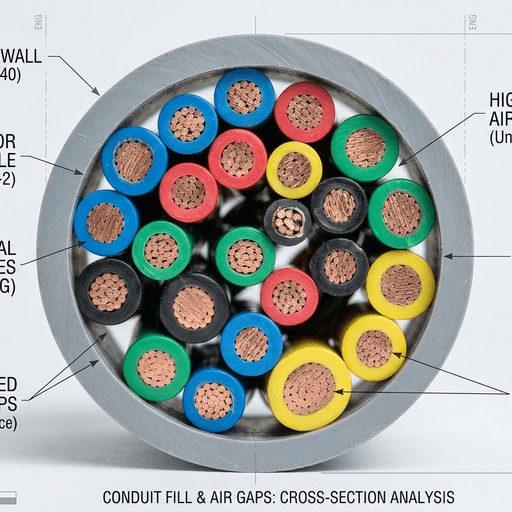
The NEC Annex C tables are great for single wire sizes, but they fail as soon as you mix #12 THHN with a #8 ground wire. Excel allows you to build a dynamic list of every wire in the run and see your total area instantly.
How to Get Your Free Conduit Fill Template
We’ve designed this tool to be as intuitive as possible. You don’t need to be an Excel expert to use it.
Step 1: Download the File
Click the button below (or head to our Downloads Page) to get the .xlsx file. It’s a small file that downloads in seconds.
Step 2: Enable Macros (If Prompted)
Our standard version uses only pure formulas (no macros) for maximum security. Some advanced versions might include “reset” buttons that require macros, but the core math is always formula-driven.
Step 3: Save to Your Cloud or Device
Save the file to your Dropbox, OneDrive, or local “Project” folder. This allows you to open it on your phone in the morning and on your office computer in the evening.
A Walkthrough of the Calculation Engine
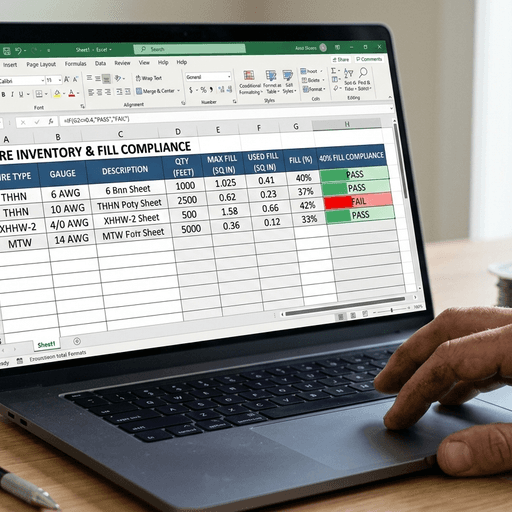
Our spreadsheet is built around the actual data from NEC Chapter 9 Tables 4 and 5. Here is how to perform your first calculation:
1. Select Your Conduit Type
Use the dropdown menu to choose your material: EMT, PVC (Sch 40 or 80), IMC, or RMC. The spreadsheet will automatically pull the internal area for that material.
2. Enter Your Wires
In the “Wire Input” section, select your insulation (e.g., THHN) and your gauge (e.g., #10). Enter the quantity of that specific wire. Repeat this for all the wires in your run.
3. Review the “Live Fill Bar”
The spreadsheet will display a progress bar. As you add wires, the bar fills up.
- Green: 0% to 35% (Safe and easy pull)
- Yellow: 35.1% to 40% (Approaching limit - watch your bends!)
- Red: Over 40% (Code Violation!)
Advanced Features: Beyond Just Math
We’ve added a few “Pro” features to this spreadsheet that you won’t find in basic online calculators:
- Derating Estimator: While primarily a fill tool, the spreadsheet includes a reference table for NEC 310.15 ampacity adjustments based on your wire count.
- Weight Calculator: Calculates the total weight of the wire bundle per 100 feet. This is vital for determining the appropriate support spacing and hanger strength.
- Price Estimator: If you input your local per-foot wire prices, the spreadsheet can give you a rough material cost for the conduit run.

Troubleshooting Common Spreadsheet Errors
- “File is Read-Only”: This usually happens if you’re trying to edit the template directly in your browser. Download it to your device first.
- “Circular Reference”: If you accidentally paste data into a formula cell, you might get this error. Simply hit “Undo” or re-download a fresh copy of the template.
- Missing Wire Types: If you are using a very rare cable type (like a custom armored cable), you can manually enter its diameter into the “Custom Input” row at the bottom of the list.
Conclusion: Digital Tools for Modern Electricians
The era of guessing conduit size is over. By using a professional Excel Conduit Fill Calculator, you protect yourself, your company, and your clients. You ensure that every job you do is perfectly sized, mathematically defensible, and built for a “smooth pull.”
Download your copy today, save it to your home screen, and never second-guess a conduit size again.
Ready to get started? Download the Professional Excel Spreadsheet Package now and start building your first digital fill schedule.
? Sıkça Sorulan Sorular
Is the Excel conduit fill calculator free to download?
Does the spreadsheet handle mixed wire sizes?
Is this spreadsheet NEC compliant?
Does it work on Excel for mobile?
Can I customize the spreadsheet for my company?
Hakkımda Mar Küs T. Webb
Marcus, Amerika Birleşik Devletleri'nde ticari ve endüstriyel elektrik tesislerinde 14 yıldan fazla saha deneyimi olan, lisanslı bir vasıflı elektrikçidir. Elektrik Sistemleri konusunda NICET Seviye II sertifikasına sahiptir ve yüksek irtifa ofis kablolarından veri merkezi konduilerini kurduğu çeşitli projelerde çalışmıştır. Marcus, NEC kod sözlüğü ile gerçek dünya işyeri kararları arasındaki boşluğu doldurmayı amaçlayan bir yazı yazmaktadır.